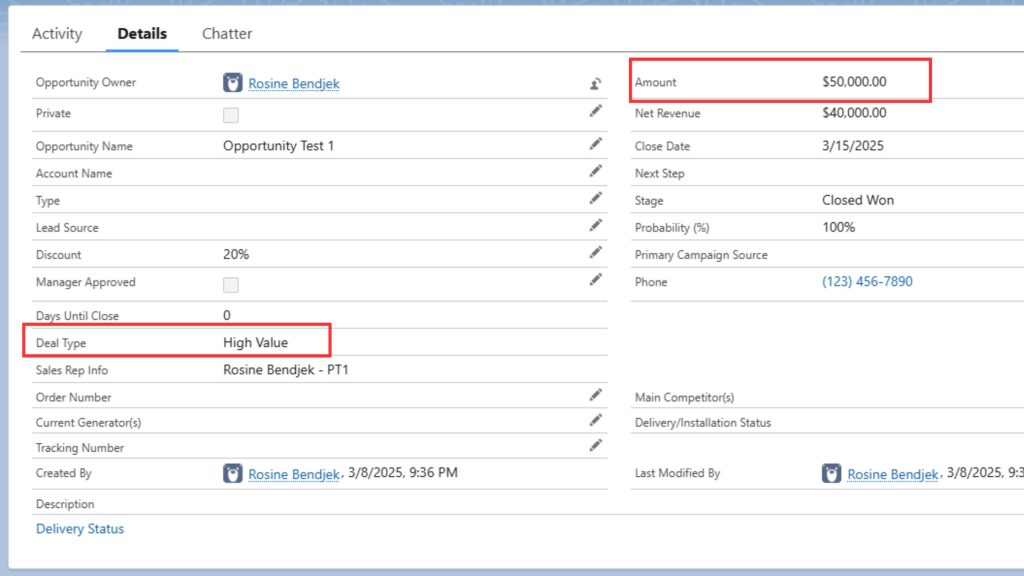

As part of my ongoing Salesforce Admin development, I completed a project-based hands-on exercise using Formula Fields to solve real business challenges at NexGen Solutions, a B2B cloud software company.
The Business Scenario
Company: NexGen Solutions – a growing B2B tech firm delivering cloud-based solutions to enterprise clients.
Problem: The Sales and Finance teams were manually calculating revenue figures and other key metrics, which led to errors, inefficiencies, and missed insights during sales reporting.
Business Need
The Sales Manager requested that key calculations and indicators be automated directly on the Opportunity object in Salesforce to:
- Save reps time by eliminating manual calculations
- Ensure consistent and accurate revenue tracking
- Surface insights like high-value deals and deadlines at a glance
- Improve visibility of sales rep responsibilities for reporting
What I Built
Using Formula Fields, I automated the following use cases:
✅ 1. Net Revenue After Discount
Calculates revenue after applying a discount:
Formula:Amount - (Amount * Discount__c)
💡 Saves reps from manual math, ensures revenue projections are accurate.
✅ 2. Days Until Close
Tracks the number of days remaining before an Opportunity closes:
Formula:IF(CloseDate >= TODAY(), CloseDate - TODAY(), 0)
💡 Helps managers identify approaching deadlines and overdue deals.
✅ 3. Deal Type Indicator
Labels Opportunities as “ High Value” if ≥ $50,000, or “ Standard Deal”:
Formula:IF(Amount >= 50000, " High Value", " Standard Deal")
💡 Quick visual cues on the Opportunity page to prioritize focus.
✅ 4. Sales Rep Info
Displays the Opportunity owner’s full name and role:
Formula:Owner.FirstName & " " & Owner.LastName & " - " & Owner.Profile.Name
💡 Improves visibility in reports and dashboards by combining user info.
Why It Matters
This hands-on training helped me apply Formula Fields in a way that delivers immediate business value — automating calculations, improving visibility, and empowering users to focus on closing deals instead of crunching numbers.
It also deepened my skillset with:
- Salesforce functions like
IF,TODAY(),TEXT,&, andOwner.Profile - Real-world field types (currency, text, number)
- Enhancing the user interface with meaningful data
📸Screenshot
Screenshot Description:
A high-value opportunity automatically labeled with “High Value” and paired with a calculated net revenue field — showcasing how formula fields deliver instant insights.