
As part of my hands-on training to strengthen my Salesforce Admin skills, I recently worked on a real-world scenario focused on data accuracy and compliance, using one of the most powerful declarative tools in Salesforce: Validation Rules.
The Business Scenario
Company: NexGen Solutions — a fast-growing B2B tech firm offering cloud-based software to enterprise clients.
Problem: The Sales Manager at NexGen Solutions noticed that inconsistent and incomplete data entry by the sales team was causing major reporting errors and operational friction. Specifically, they were dealing with:
- Incomplete revenue data on closed deals
- Past Close Dates entered in active pipelines
- Unauthorized discounts exceeding 20%
- Inconsistent phone number formatting for Contacts
What I Built
To solve these issues, I implemented the following Validation Rules in Salesforce:
✅ 1. Required Amount on Closed Deals
Ensured that when the Opportunity Stage is “Closed Won”, the Amount field must be filled in.
Formula:

AND(
  ISPICKVAL(StageName, "Closed Won"),
  ISBLANK(Amount)
)
✅ 2. Close Date Cannot Be in the Past
Blocked users from entering a Close Date earlier than today to maintain accurate pipeline tracking.
Forrmula:

CloseDate < TODAY()
✅ 3. Max Discount Threshold
Prevented users from entering a Discount (%) greater than 20 unless they have managerial override.
Formula:

Discount__c > 0.20
✅ 4. Phone Number Format Standardization
Enforced a standard pattern (e.g., (123) 456-7890) for Contact phone numbers using REGEX.
Formula:

NOT(REGEX(Phone, "\\(\\d{3}\\) \\d{3}-\\d{4}"))
Why It Matters
These Validation Rules simulate the type of work Salesforce Admins are expected to do daily — translating business requirements into automated rules that protect data quality and streamline operations.
This project improved my ability to:
- Work with logical functions like
AND,ISBLANK,ISPICKVAL, andREGEX - Understand real business problems and solve them declaratively
- Build scalable, no-code solutions that directly impact business efficiency
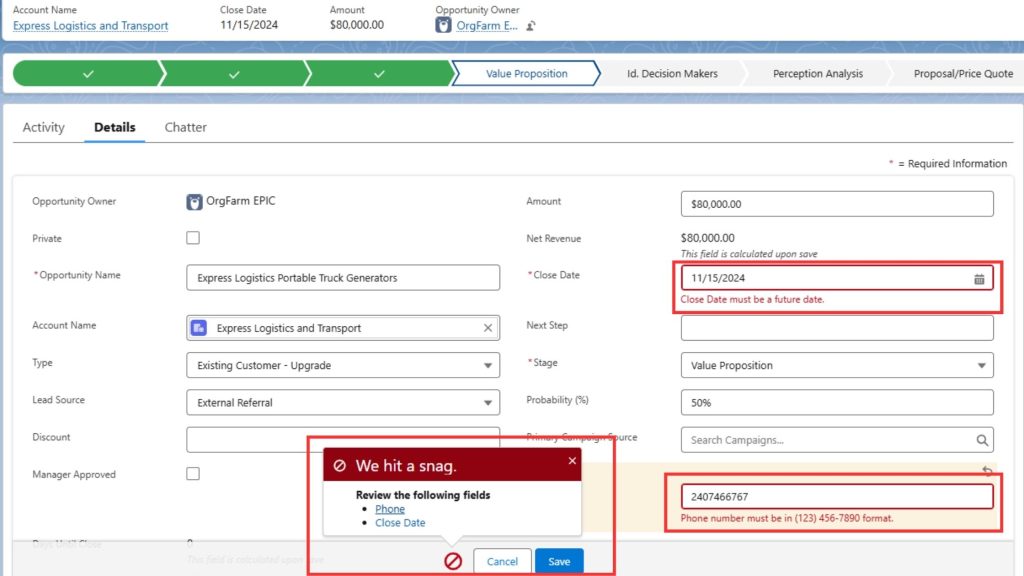
📸 Screenshot
A Salesforce error message triggered by Validation Rules that prevent past Close Dates and enforce consistent phone number formatting — helping maintain accurate pipeline data and clean customer records.